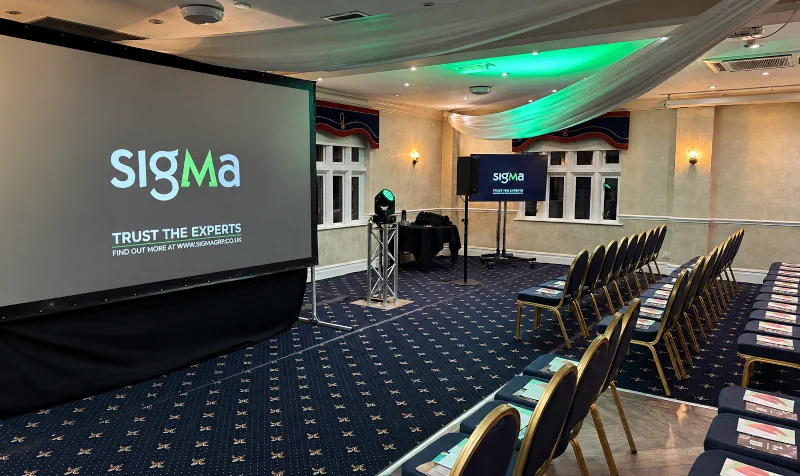
Case Study - Assured Data Protection Conference
A successful conference gives people the space to listen, learn and connect. The audiovisual setup supports all of that, helping every delegate hear the speakers, follow the presentations and take part.
Getting it right involves more than booking microphones and a screen. The room layout, running order and way presenters use the equipment all need to work together.
Whether you’re organising a company update, an industry conference or an event with remote contributors, these eight AV essentials will help you plan with confidence.
1. Clear sound throughout the audience area
If delegates struggle to hear, even the most engaging presentation becomes difficult to follow. Clear, intelligible speech should be one of the first priorities when planning conference AV.
The sound system needs to suit the room and audience layout. A long conference room, a wide ballroom and a space with a low ceiling can each require a different approach to speaker placement.
Think about everyone in the room, including people seated at the back or to the sides. Increasing the volume at the front won’t necessarily give those delegates a clearer experience.
Share your seating plan and expected attendance with your AV supplier. Mention any balconies, pillars or separate audience areas so these can be considered before the equipment is selected.
2. The right microphones for speakers and discussions
Choose microphones around how people will present.
A handheld microphone can work well for introductions, audience questions and speakers who are comfortable holding one. A headset or lapel microphone leaves the presenter’s hands free, which can be helpful when moving around or demonstrating something.
Panel discussions need particular attention. Several people may speak in quick succession, and each needs a suitable microphone arrangement so the conversation can flow naturally.
Let your supplier know:
- How many presenters or panellists will be on stage at once.
- Whether speakers will stay at a lectern or move around.
- Whether you’re planning questions from the audience.
- Whether any contributors will join remotely.
Allow time to fit and check microphones before each session. Presenters should know how to wear or hold them and who to approach if they need help.
3. Screens that delegates can comfortably read
Screen size should be based on what people need to see and how far away they will sit.
A display that looks generous in an empty room may feel much smaller once the seating is in place. Detailed charts, spreadsheets and small text can be especially difficult to follow from the back.
Depending on the venue and content, suitable options might include large-format displays, projection or an LED video wall. Wider rooms may benefit from more than one screen so delegates don’t have to turn away from the stage to follow the presentation.
Check sightlines as well as screen dimensions. Lecterns, stage furniture and other guests can obstruct the view.
Ask your AV supplier to consider the screen arrangement alongside the seating plan, rather than choosing each separately.
4. Presentations prepared and tested in advance
Collecting presentations before the event gives the technical team time to check layouts, fonts, videos and audio playback.
Agree on a deadline for submissions and make sure speakers know the required slide format. If several people are editing files, use clear filenames so there is no confusion about which version should be shown.
Embedded videos deserve a separate check. Confirm that they play correctly on the presentation system and that their sound reaches the audience.
It’s also worth discussing how speakers will control their slides. A presentation remote may be enough for some sessions, while others need a technician to follow cues.
Keep a backup copy of the final presentations and agree on a process for late changes. A few minutes of preparation can prevent an awkward pause in front of a full room.
5. Lighting that helps the audience see the presenters
Conference lighting needs to make the people on stage easy to see while supporting the atmosphere of the event.
Decorative uplighting can make a room look inviting, but it may not provide suitable light on a speaker’s face. Dedicated stage lighting helps presenters remain visible, particularly when the room lighting is reduced for screens.
If the conference will be filmed or streamed, discuss this early. Camera coverage adds another consideration when planning lighting positions and levels.
Think about where people will actually stand. A presenter who moves away from the lectern should still be visible, and panellists seated across the stage need appropriate coverage too.
The lighting, screens and stage layout should be planned together so they work comfortably for both the audience and presenters.
6. Reliable connections for hybrid participation
If remote speakers or delegates are involved, they need to be included in the technical planning from the start.
A hybrid conference has to connect the room and the online audience. Remote participants need to hear the relevant microphones and presentation audio, while people in the venue need to hear remote contributors clearly.
Agree on what the online audience will see. This could include presentation slides, camera pictures of the stage or a combination of both.
Check the venue’s internet provision with the technical team, including whether a suitable dedicated wired connection is available. Arrange a test call with remote presenters using the devices and connections they plan to use on the day.
Also decide who will monitor the meeting platform, manage remote questions and help contributors join at the correct time. These responsibilities are easier to handle when they’re assigned in advance.
7. A clear running order and time for rehearsals
The running order connects the technical setup to what happens on stage.
Your AV team needs to know when presentations start, which microphones are required and where videos, remote contributions or audience questions fit into the programme.
Include speaker names, session timings, breaks and any changes to the stage layout. Identify who will give the cue to start each session and who can approve changes during the event.
Allow time for a rehearsal or technical walkthrough before delegates arrive. This gives presenters a chance to check their slides, practise with the remote and become familiar with the stage.
Even a short walkthrough can reveal issues that are easy to fix beforehand, such as an unclear video cue or a presenter needing to see their notes.
8. Experienced technical support and an agreed backup plan
Decide who will manage the equipment throughout the conference.
An event with several speakers, panel discussions, video playback and remote contributors benefits from technicians who understand the programme and can respond as it develops.
Clarify what your AV package includes. Delivery and setup are different from having a team operating sound, presentations, lighting and video during the event.
Ask how the supplier will handle likely problems, such as a failed presentation laptop or a microphone needing replacement. The arrangements should reflect the event’s complexity and the importance of each element.
Give your technical team a named event contact and make sure presenters know where to find support. Clear communication helps small changes stay manageable and keeps the programme moving.
Planning Conference AV with Audioserv
You don’t need to have every equipment choice worked out before speaking to an AV supplier. Your event date, venue, audience size and outline programme are a useful starting point.
At Audioserv, we help organisers bring sound, screens, lighting and technical operation together for conferences and corporate events. Based in Leeds, we support events across Yorkshire and throughout the UK.
Whether you’re planning an in-person conference or need to connect delegates across different locations, we can help you work through the practical requirements.
Explore our conference AV and corporate event production services, or contact Audioserv to discuss your event.